
Solution · Built for movers

AI-Assisted Moving Inventory Software

Build detailed estimated inventory for pricing, then track the individual physical items handled in the field with QR labels, photos, From/To scans, and custody history.

Guided Moverai interviewTry AI Inventory Vision
No contract. No obligations.
From lead to closeout✓ Capture the lead and customer requirements✓ Build services, route details, inventory, and pricing✓ Schedule surveys, crews, trucks, agents, or carriers✓ Communicate, collect documents and payments, and track changes✓ Close the job with reporting, payroll, claims, and financial context

Inside Moverai

See the workflow in the real product.

AI identifies visible items, then returns inventory your team can review and edit.
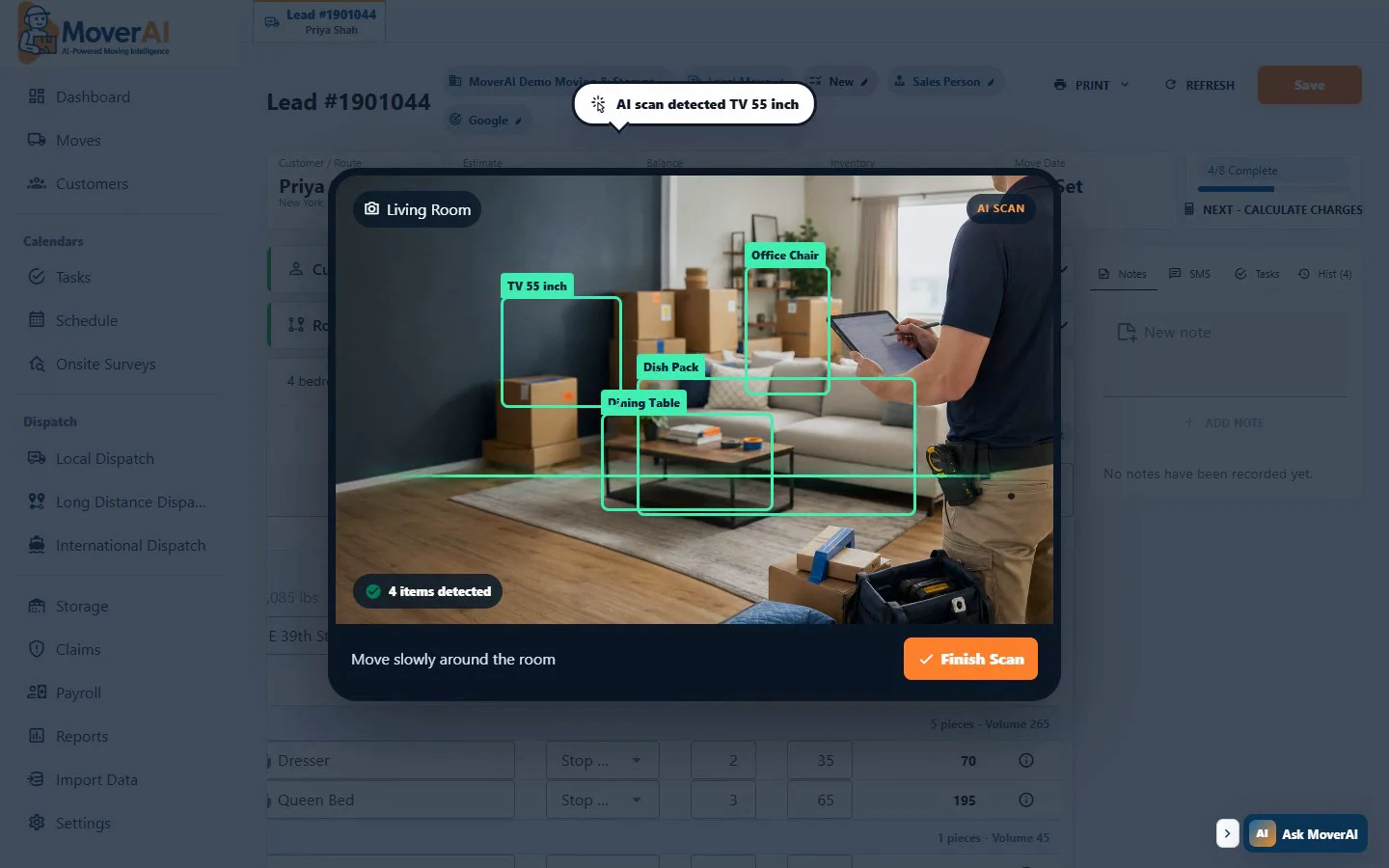
Moverai AI Inventory Vision identifying household items and preparing moving inventory
AI identifies visible items, then returns inventory your team can review and edit. Demo data shown.

Business outcomes

Make the operation easier to run—and easier to understand.

01

Create editable estimated inventory with AI Inventory Vision

Use the same current customer and move information across the team, with fewer handoffs, fewer disconnected tools, and a clearer next action.

02

Calculate volume and weight as quantities change

Use the same current customer and move information across the team, with fewer handoffs, fewer disconnected tools, and a clearer next action.

03

Keep field custody events separate from the estimate while connecting both to the move

Use the same current customer and move information across the team, with fewer handoffs, fewer disconnected tools, and a clearer next action.

A realistic workflow

How moving teams use it.

A moving company uses moving inventory software inside the same live order so sales, operations, field teams, customers, and accounting can act without rebuilding the record.

Feature overview

Purpose-built moving software, with AI working on the details.

One connected move record

Customer details, services, route stops, inventory, documents, communication, charges, payments, and operational activity remain attached to the same move from lead through closeout.

AI inside the daily workflow

Moverai uses AI for practical work: creating editable inventory from a room scan, preparing reports from plain-language requests, helping staff find the right screen, and assisting with document setup. Your team reviews and approves the result.

Purpose-built team workspaces

Office staff, estimators, field teams, and customers see focused tools for their responsibilities while changes return to the company’s shared operational record.

Migration without starting over

Guided conversion tools help map customers, leads, estimates, jobs, employees, vehicles, notes, history, and other structured records from supported moving software or spreadsheet exports.

How it works

Information follows the move—not the software screen.

Each department gets a focused workspace, while the customer, service, route, inventory, operational, and financial context remains connected.

  1. 1. Capture the lead and customer requirements
  2. 2. Build services, route details, inventory, and pricing
  3. 3. Schedule surveys, crews, trucks, agents, or carriers
  4. 4. Communicate, collect documents and payments, and track changes
  5. 5. Close the job with reporting, payroll, claims, and financial context

What AI contributes

AI prepares the work.

Moverai prepares structured work, surfaces context, and reduces repetitive setup inside the normal workflow.

Human review boundary

Your people make the decisions.

Your team reviews pricing, bookings, assignments, financial decisions, customer commitments, and compliance-sensitive work before it becomes final.

Frequently asked questions

Questions moving companies ask.

See the workflow

Explore the applicable Moverai demo.

Try AI Inventory Vision →

See it in action

Explore Moverai in a live working environment.

No booking or sales call required. Choose a workflow and explore it immediately.

Guided Moverai interview