
Solution · Built for movers
Moving Estimating Software for Reviewed, Service-Based Quotes
Build a moving estimate from the customer’s route, access conditions, reviewed inventory and requested services—not a disconnected spreadsheet. Moverai keeps company rates, labor, travel, packing and materials with the order your office and crews will use.
Inside Moverai
See the workflow in the real product.
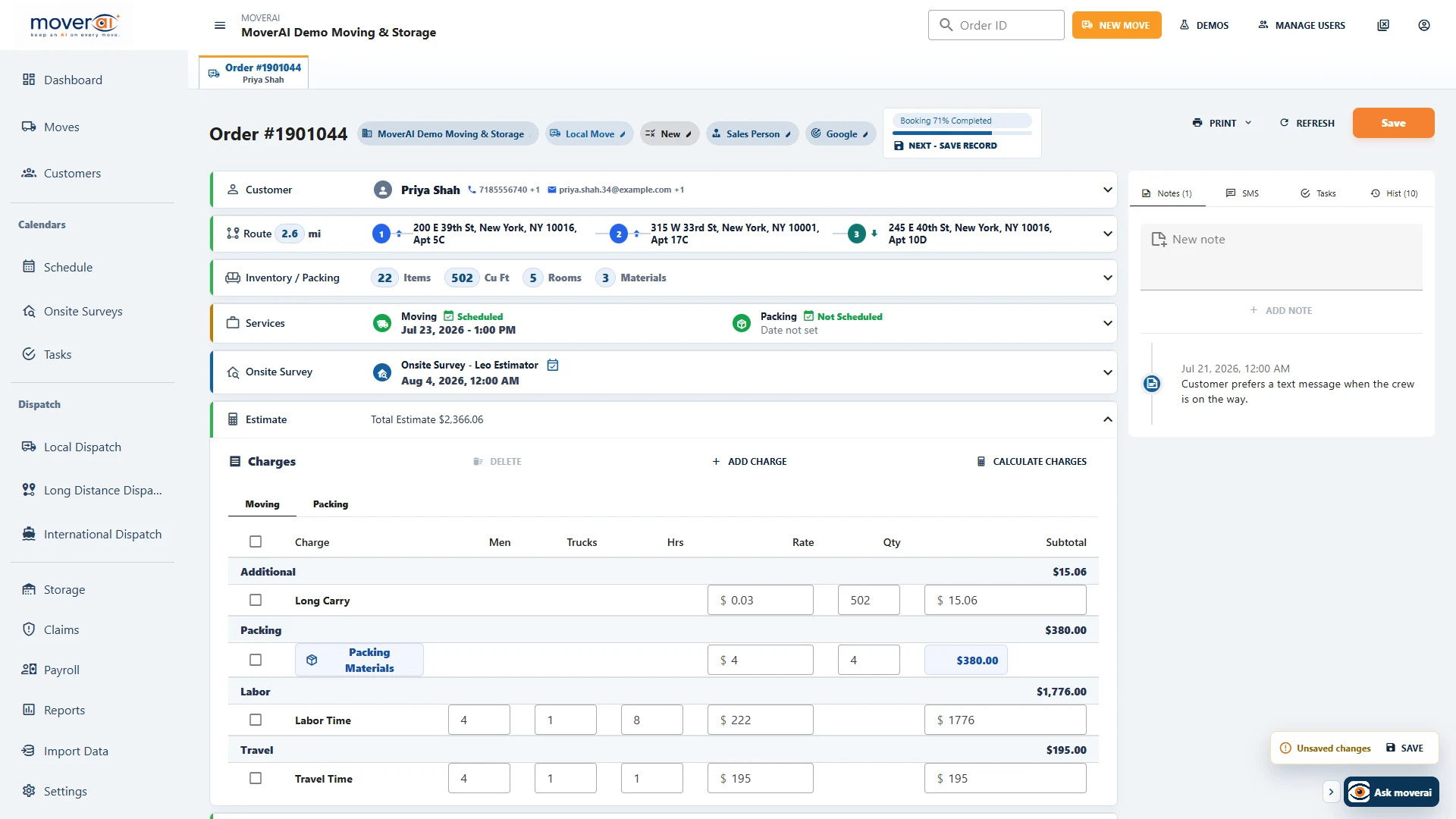
Build and calculate charges from the same inventory, services, crew requirements, and move details operations will use.
Business outcomes
What changes for your team.
Price the services and inventory your estimator actually reviewed
Use configured company rates and inspect the calculation
Carry approved requirements into dispatch and review actuals at closeout
A realistic workflow
How moving teams use it.
Illustrative local move: an estimator reviews a two-bedroom inventory, stairs and parking access, then plans a crew/truck rate for four labor hours and one travel hour. Packing is a separate two-hour service with 20 cartons. The example below shows how separate inputs produce reviewable charge lines; it is not a Moverai price recommendation or a real company tariff.
See an illustrative estimate calculation.
| Reviewed input | Illustrative charge |
|---|---|
| Moving labor: 4 hours × $180 crew/truck rate | $720 |
| Travel: 1 hour × $180 | $180 |
| Packing labor: 2 hours × $75 | $150 |
| Cartons: 20 × $3 | $60 |
| Illustrative total | $1,110 illustrative estimate |
The $180 crew/truck rate is not multiplied again by the number of movers. Replace every rate and quantity with the company’s applicable tariff and reviewed job requirements.
What should an estimator enter before calculating?
Start with service dates, all stops, access notes, the item inventory and packing requirements. Check the per-item measurements and quantities: a route alone cannot establish how much labor or material the move needs.
Hourly, zone and mileage/weight calculations use different inputs. Review missing mileage, weight, volume or rate configuration rather than treating a displayed total as automatic approval.
What happens after the customer accepts?
Keep the approved services, inventory, requirements and documents on the moving order. Dispatch assigns resources to the booked work, while field updates and final financial review continue against that same record.
Feature overview
What the feature supports.
Company tariffs and charge catalogs
Use your configured charges and rates. The tariff-import workflow analyzes a company’s own document into editable charges for review. Confirming an import replaces the current charge catalog after a backup; analysis alone does not change live rates.
Hourly labor, travel and packing
Review crew size, trucks, labor hours, travel time and company minimums. Packing labor and materials remain identifiable charges, so your estimator can check quantities and avoid counting the same work twice.
Volume, zone and mileage/weight pricing
Configured calculation rules support quantity and volume charges, zone-based rates, and mileage/weight tables including CWT and minimum charges for supported 400N tariff setups. The available calculation depends on the company’s saved rates and the service being priced.
An estimate that stays with the move
Service-scoped charge categories, deposits, pickup/delivery balances, payments and balance due remain on the order. Booking and dispatch use the same service requirements; closeout provides actual labor, materials and charges for staff review.
How it works
Follow the workflow.
- 1. Enter customer, pickup/delivery stops, dates, access and requested services
- 2. Review survey inventory, quantities, volume, weight and packing needs
- 3. Select company charges and validate labor, travel, materials and applicable minimums
- 4. Review the customer document and approve the estimate before sending
- 5. Book the services, assign resources and review actual work at closeout
What AI contributes
AI prepares the work.
AI Inventory Vision can prepare an editable item list. Tariff analysis can prepare draft charge records from your document. Neither result approves the rate, inventory or customer commitment.
Human review boundary
Your people make the decisions.
Your estimator checks the inventory, access, tariff applicability, minimums, discounts, taxes, document wording and final price. Estimate classifications and regulatory obligations remain your company’s responsibility.
Frequently asked questions
Questions about this workflow.
See the workflow
Explore the applicable Moverai demo.
See it in action
Explore Moverai in a live working environment.
No booking or sales call required. Choose a workflow and explore it immediately.